


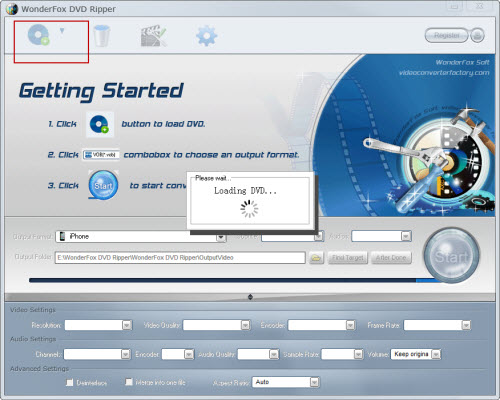
1. Load DVD files to the WonderFox DVD Ripper
Insert DVD disc to DVD-ROM, click "Load DVD" button to browse your computer and add, you can also add DVD folder, ISO file or IFO file you want to convert to the program
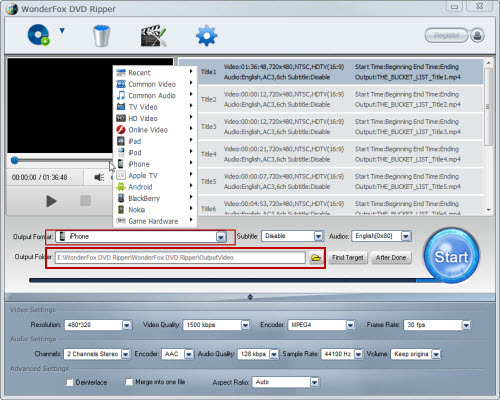
2. Set output format and destination folder
From the drop-down list of "Profile" you can choose iPhone 5 as the output format, then click "Output" to select the destination folder for converted files if you want to change the default folder.
Note: If you don't like the default setting, click "Settings" button next to "Profile"; you can set the video resolution, frame rate, audio channels, bitrates etc.
3. Convert DVD to M4V for iPhone 5
All necessary settings are finished, then click "Start". The conversion time depends on the size of the DVD you are converting with this DVD Ripper.
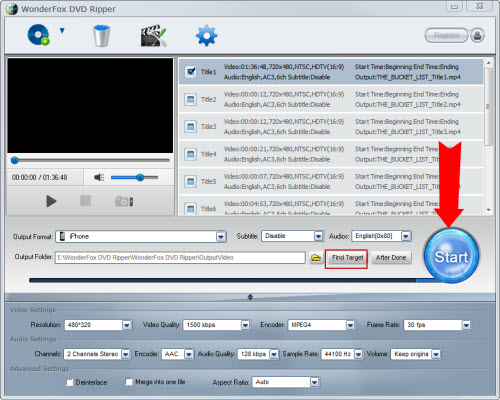
After the conversion is done, you can easily find the converted files on your computer by clicking "Find Target". Simply drag them to your iPhone 5.
As you can see, you just need several simple steps and then you can convert DVD video to iPhone 5 easily with WonderFox DVD Ripper.
The updated iPhone will most likely gain the newer A5 dual-core processor (currently powering the iPad 2), an upgraded rear camera (likely 8 megapixel), and possibly a larger 4.0" display. That means iPhone 5 can support higher quality video than before type. But it still fails as for making use of the resources in DVDs. The good software which can convert DVD video to iPhone 5 is needed.
WonderFox DVD Ripper is perfect for this job. Now that iPhone 5 support high quality video. Can this software rip HD DVD to iPhone 5 or convert DVD to HD video format which iPhone 5 supports? The answer is absolutely yes. We just have to follow the steps above as well. Then we can enjoy HD movie on our iPhone 5. By the way, it also has amazing conversion speed and gorgeous output quality because of the good algorithm. It just takes us less time to wait.
1. Convert homemade DVDs or VIDEO-TS folder files for viewing on your iPhone 5 anytime and anywhere.
2. Besides converting DVD video to iPhone 5. It can also extract DVD audio to M4A, MP3, AAC, etc for iPhone 5.
3. Other format and devices such as AVI, MKV, iPad 3, Nokia Phone, Android and so on are compatible well. The number of its supported output format and devices is 113.
3. Capture your favorite scene from video and save in BMP, JPG image format.
4. It also has powerful editing functions including crop, trim merge and adding special effects.
For such great software, all we have to do is enjoying the converting processes!
All in all, the WonderFox DVD Ripper is really a good choice for us to rip/convert DVD to iPhone compatible video formats. With the DVD to iPhone ripper/converter, we can easily rip DVD to iPhone 4 or convert DVD to iPhone 5. By the way, the DVD ripper runs well on Windows, so, we can easily convert DVD to PC, convert DVD to Hadr Drive, copy DVD to tablet, convert DVD to cell phone with it. Furthermore, the software also allow us to convert DVD to AVI, convert DVD to MKV, convert DVD to WMV, convert DVD movies to MP4, rip DVD files to audio; and besides, rip DVD to iPad 3, convert DVD to Nokia video type, convert DVD to BlackBerry video formats and convert DVD to Android devices are also available for us.




