


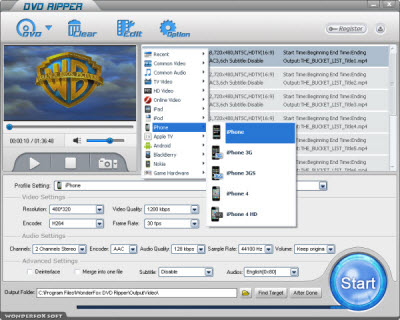
This part of DVD to iPhone 5 guide will show you the benefits of DVD to iPhone 5 conversion. As the most popular smartphone over the world, iPhone 5 has gained much fame and attention from mobile fans. iPhone 5 has already exceeded the capability of a common cellphone. One of the outstanding points is its wonderful video playback. With a big-size touch screen of high resolution, it is really such a great choice for video fans to enjoy videos with iPhone 5. Commonly, iPhone 5 can support online video playback and usual videos playback of SD-card. However, there is also kind of terrible situation for iPhone fans. You still can not enjoy your favorite DVD video on iPhone 5 directly. DVD disk can provide users with various video resources and video effect. It is totally free and convenient to enjoy DVD video on iPhone 5 after the DVD to iPhone 5 conversion. We can take the favorite DVD videos anywhere to go shares without a lumping CD-drive. How random it is!
After showing the advantage of DVD to iPhone 5 conversion, this part of DVD to iPhone 5 guide presents more information on how to choose a great dvd to iphone 5 converter, The great one can always convert DVD to iPhone 5 fast and safely without any viruses or spywares, and ensures the original high-quality video at the same time. Users just need spend short time waiting for the converting process and get the nice video effect easily. In fact, a great DVD ripper can really provide users with easy and fast conversion process of DVD to iPhone 5. When you try to choose a great one, you do just need consider these elements mentioned above.
A DVD to iPhone 5 can never lose an easy-step guide of the DVD to iPhone 5 conversion. WonderFox DVD Ripper is a great choice for you with the beneficial features. Users can make few clicks to operate the software and get the output high-quality video effect with fast speed. Here are the easy steps to convert DVD to iPhone 5.
Step1: Load DVD disk firstly.
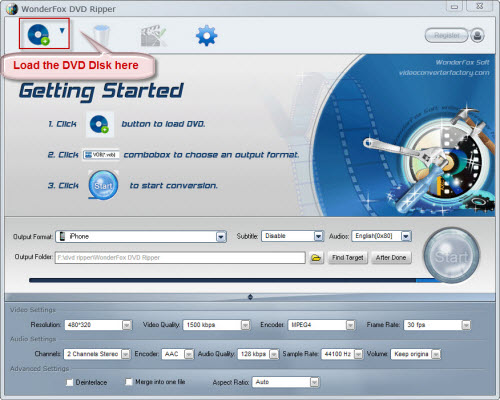
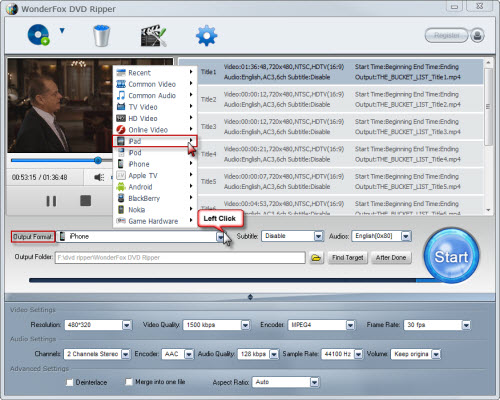
Step2: Choose iPhone 5 as the output video device
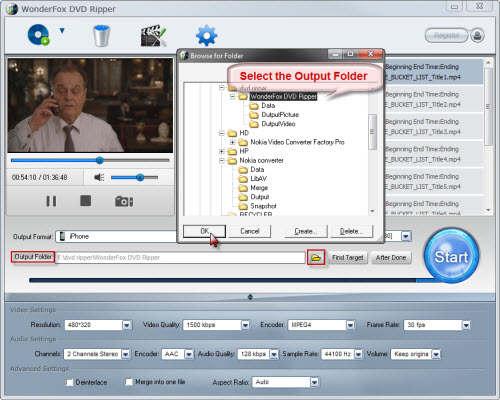
Step3: Select the output folder as you want. (Optional)
Step4: Click "Start" to launch the ripping process.
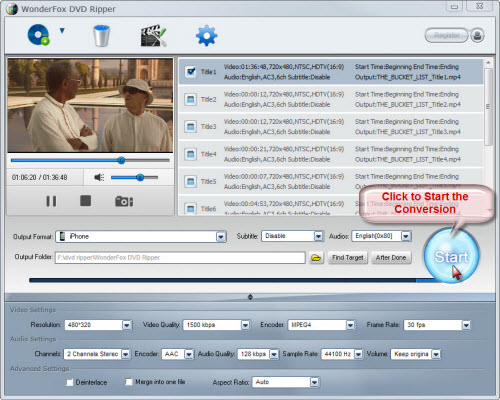
Step5: Find the output video and enjoy them on your iPhone 5.
Based on the fact, WonderFox DVD Ripper is really your right choice for DVD to iPhone 5 software. You can surely get nice DVD video enjoyment after the conversion. Hope this DVD to iPhone 5 guide can be helpful to you!
All in all, the WonderFox DVD Ripper is really a good choice for us to rip/convert DVD to iPhone compatible video formats. With the DVD to iPhone ripper/converter, we can easily rip DVD to iPhone 4 or convert DVD to iPhone 5. By the way, the DVD ripper runs well on Windows, so, we can easily convert DVD to PC, convert DVD to Hadr Drive, copy DVD to tablet, convert DVD to cell phone with it. Furthermore, the software also allow us to convert DVD to AVI, convert DVD to MKV, convert DVD to WMV, convert DVD movies to MP4, rip DVD files to audio; and besides, rip DVD to iPad 3, convert DVD to Nokia video type, convert DVD to BlackBerry video formats and convert DVD to Android devices are also available for us.




