


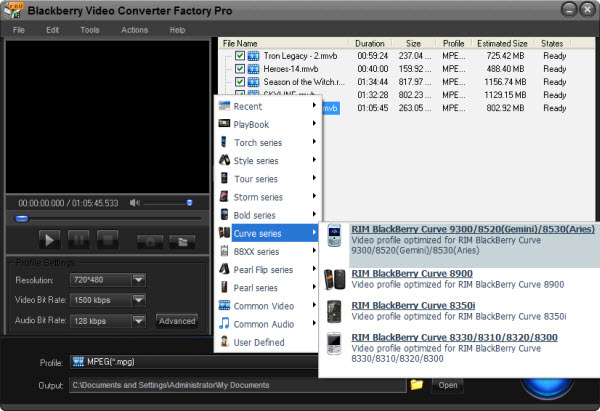
BlackBerry cell phone is most famous for its business function such as email checking. BlackBerry series can be regard as a classic; the classical email checking and the classical full-keyboard. And the BlackBerry style also influents other cell phones such as the Nokia E-series, which is just like a copy of BlackBerry, more or less. Now, the curve 8900 is popular. The new business phone also focused on some multimedia function - the 2.4-inch display and the 480*360 screen resolution are just nice for videos. So convert video to BlackBerry Curve 8900 can make you have a rest during your long-time work. For getting the curve 8900 videos, commonly, the following two ways are easy but useful.
In this way, users don't have to convert video to BlackBerry curve 8900. There are some BlackBerry Forums on the internet where may provide some videos for BlackBerry phones with the right video format. Such as blackberryforums.com, the BlackBerry users would like to share some BlackBerry videos for all in the forum; then other users just have to download one he want to his curve 8900. This is the direct and easy way. But it's hard for you to get the one you want in such place, after all the video resources there are limited. Then the other way may meet your request.
In this way, for getting curve 8900 videos, we have to convert video to BlackBerry curve 8900. Even it maybe a little complicated, we can get the latest MTV or videos. And personally, I think it's the best way, at least for me.
For the video conversion software, here I suggest BlackBerry Video Converter Factory Pro. It is the professional software for BlackBerry video converting. The output devices support every BlackBerry series. And the advanced functions (merge, clip, crop and effect) are also available for all users to edit the videos. But all advantages just cost $9.95. It's a worthy deal.
After convert video to BlackBerry curve 8900, it's convenient for you to rest a while during a long time work. And may nobody know what you are doing then; even just think you are checking email.
As the passage mentioned above, it is easy for us to get curve videos with the help of a related video converter, if you think that Blackberry Video Converter Factory Pro is good or not bad, now it is necessary for you to know how to convert video to Blackberry Curve 8900 with this video converter.
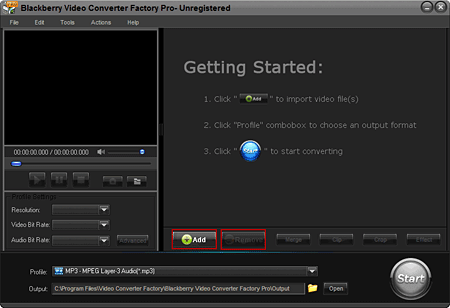
Step1: Import video(s) - Launch Blackberry Video Converter Factory Pro Click, 'Add' button to import video(s), click 'Remove' button to delete video(s).
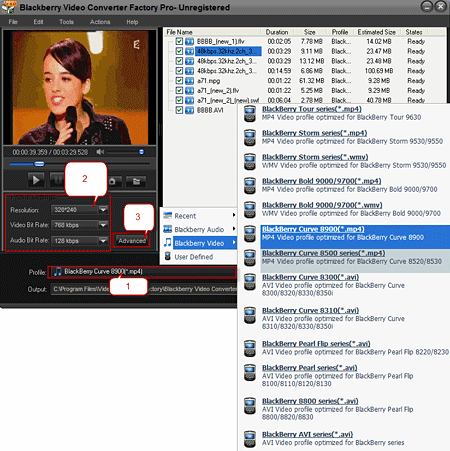
Step2: Choose an output format - 2-1, Click 'Profile' combo box to choose an output format; 2-2, Common profile settings, in most cases, we provide multi-options for each setting; 2-3, More advanced profile settings.
Step3: Click 'Start' button on the interface of this video converter to begin the converting processes.
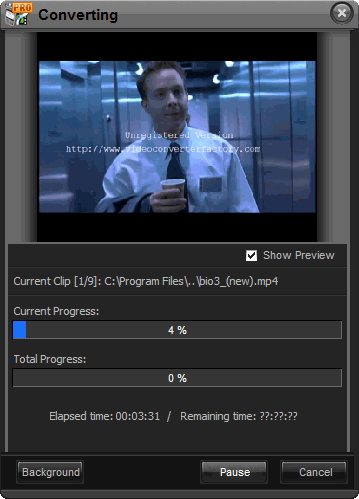
Like what you see, you will feel so easy to do the job. With Blackberry Video Converter Factory Pro, you will never worry about how to convert video to Blackberry Curve 8900.
Screenshot of BlackBerry Video Converter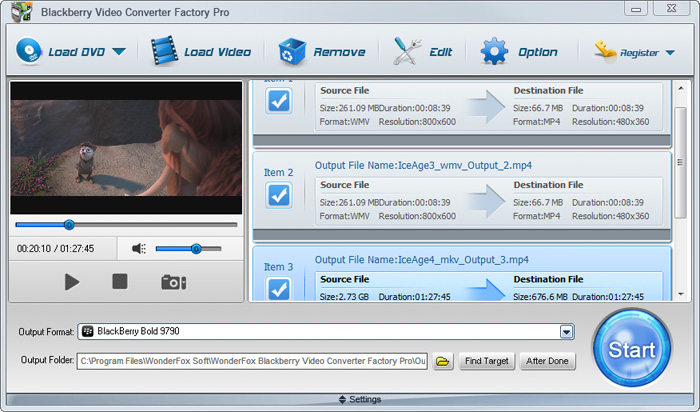


BlackBerry Video Converter Factory Pro is specially designed for BlackBerry devices, it can convert virtually all video and audio files to nearly all BlackBerry devices with optimized presets. (learn more about BlackBerry Video Converter Factory Pro and its Format References >>)
Here I will list some hot searches about converting videos to BlackBerry devices below.
For users who want to enjoy FLV videos on BlackBerry cell phones or PlayBook, BlackBerry Video Converter Factory Pro can help you convert FLV to BlackBerry Curve 9300, convert FLV to BlackBerry Style 9670, convert flv to BlackBerry Strom 9520 and much more.
And, for users who want to play MKV files, including HD MKV files, BlackBerry Video Converter Factory Pro can easily help you convert MKV to BlackBerry PlayBook supported video, help you effortlessly convert MKV to nearly all BlackBerry cell phones, such as converting MKV to BlackBerry Curve 8900 and converting MKV to BlackBerry Bold 9700.
In conclusion, BlackBerry Video Converter Factory Pro is definitely the best chocie for you to convert video to BlackBerry devices supported videos. If you want to know more tips and tutorials about BlackBerry Video Converter Factory Pro, please see the BlackBerry video converting tips center.


