


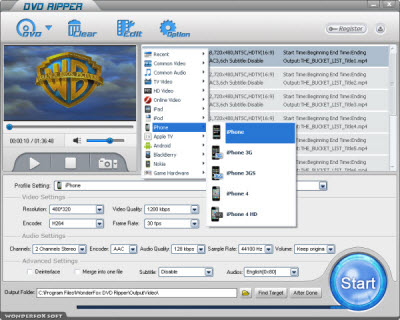
If you want to convert DVD to iPhone 5 file, you firstly need a good iPhone 5 DVD ripper, WonderFox DVD Ripper can serve as the good one. Here I will set WonderFox DVD Ripper as an example to show you how to convert DVD to iPhone 5 file.
1. Load DVD files to the DVD video to iPhone 5 Converter
Insert DVD disc to DVD-ROM, click "Load DVD" button to browse your computer and add, you can also add DVD folder, ISO file or IFO file you want to convert to the program.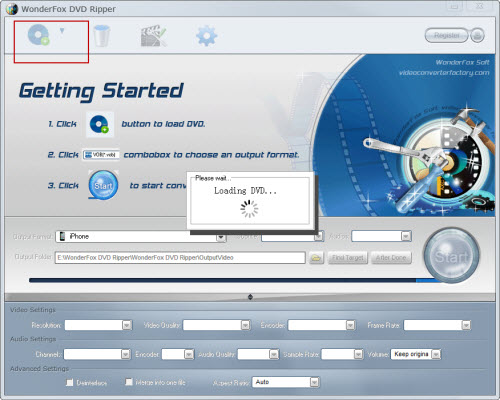
2. Set output format and destination folder
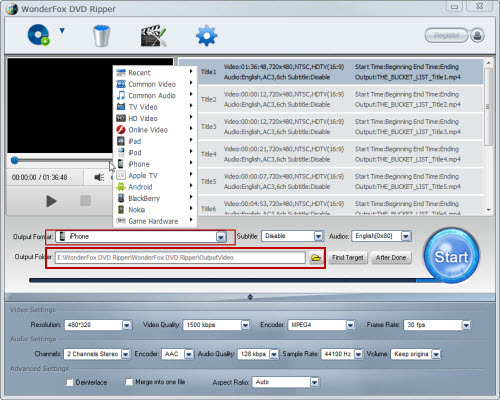
From the drop-down list of "Profile" you can choose iPhone 5 as the output format, then click "Output" to select the destination folder for converted files if you want to change the default folder. Note: If you don't like the default setting, click "Settings" button next to "Profile"; you can set the video resolution, frame rate, audio channels, bitrates etc.
3. Convert DVD to M4V for iPhone 5
All necessary settings are finished, then click "Start". The conversion time depends on the size of the DVD you are converting with this DVD Ripper.
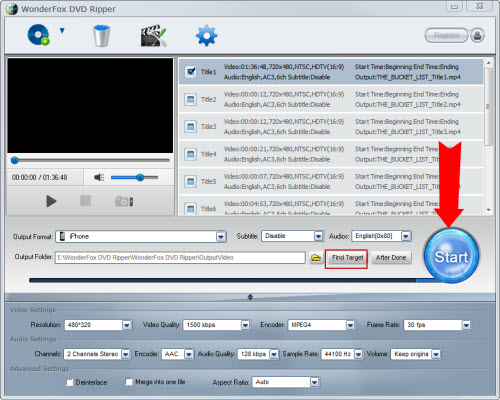
After the conversion is done, you can easily find the converted files on your computer by clicking "Find Target". Simply drag them to your iPhone 5.
Since iPhone 5 is so new, why do we still need an iPhone 5 to convert DVD to iPhone 5 file? Here is the reason. The 4.0-inch screen, iOS5 operating system, 8-mega pixel camera, stronger signals, longer stand-by time, etc are the new features iPhone 5 has. The most excited thing is that it provides can easily deal with 1080P HD videos. For iPhone 5 owners, it means that iPhone 5 is not only a mobile phone, it is also a wonderful media device, which is an ideal choice to play and watch DVD movies.
But it cannot play DVDs directly, because as we know the iPhone 5 does not have a DVD hard drive and most of the DVDs are protected by the CSS copy protection. In consideration of this fact, you need to convert DVD to iPhone 5 file and then you can play and watch DVD movies on it.
Another limitation of iPhone 5 is that it can only support the video formats such as MP4/3GP/AVC/AVI, and audio formats such as MP3/AAC/AAC+/AMR/WMA/WAV, which means it cannot support DVD video formats. So we need to convert DVD to iPhone 5 file. And WonderFox DVD Ripper can solve this well.
Firstly, high output quality and fast conversion speed. A good DVD converter must have a high conversion speed, and it's no worth spending a long time to convert DVD to iPhone 5 file. And it should make the converted files have the same quality as the original files. With the development of the multimedia technology, WonderFox DVD Ripper achieves much higher speed than other DVD rippers and high output quality through the optimized encoding speed.
Secondly, as a DVD converter, it should have the ability to convert DVD to the video and audio formats compatible with your media device with high output quality and can convert DVD to almost all the frequently-used video and audio formats, which are compatible with almost all the media devices currently in fashion, even the latest iPhone 5.
Besides, a good DVD converter should have some other functions. Then, the safety is another important point for a DVD converter. WonderFox DVD Ripper has powerful editing functions including crop, trim merge and adding special effects. And it is totally safe, Over 40 antivirus' text prove that it is clean and no-virus.
From the above points, we have learned how to distinguish if a DVD converter is fit for you, WonderFox DVD Ripper is absolutely the best choice.
All in all, the WonderFox DVD Ripper is really a good choice for us to rip/convert DVD to iPhone compatible video formats. With the DVD to iPhone ripper/converter, we can easily rip DVD to iPhone 4 or convert DVD to iPhone 5. By the way, the DVD ripper runs well on Windows, so, we can easily convert DVD to PC, convert DVD to Hadr Drive, copy DVD to tablet, convert DVD to cell phone with it. Furthermore, the software also allow us to convert DVD to AVI, convert DVD to MKV, convert DVD to WMV, convert DVD movies to MP4, rip DVD files to audio; and besides, rip DVD to iPad 3, convert DVD to Nokia video type, convert DVD to BlackBerry video formats and convert DVD to Android devices are also available for us.




